Chapter 4: Channel Configuration and Pre-Arm Check Settings
4. Common Configuration and Tuning Parameters
Aircraft parameters often need to be changed to accommodate different peripherals. Refer to the relevant manuals for details. All parameters can be searched and modified on the page shown below. Exact settings vary by aircraft, so this section focuses on several commonly used parameters for reference.
4.1 Radio Transmitter Channel
In the Full Parameter List, locate FLTMODE_CH = X, where X is the desired channel number, to change the channel used for flight-mode selection.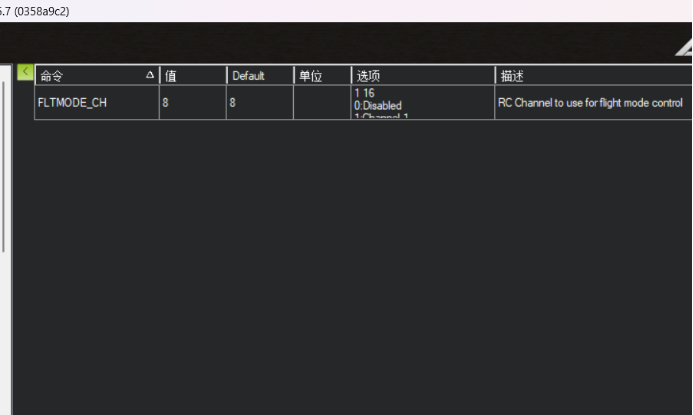
Setting this parameter to 6 assigns flight-mode selection to the switch mapped to channel 6 on the radio transmitter.
4.2 Pre-Arm Checks
ArduPilot firmware applies comprehensive pre-arm requirements. With default parameters, dozens of checks must pass before arming is permitted. Because an aircraft may not include every supported peripheral, you can use this parameter to disable individual checks that are not applicable.
First search for ARMING.
Locate ARMING_CHECK = 1. A dialog will appear; disable only the checks that cannot pass because the corresponding hardware is not installed.
For example, if the aircraft has no storage card and therefore cannot pass the logging check, clear Logging Available in the dialog.
Otherwise, the aircraft cannot pass the pre-arm checks and take off.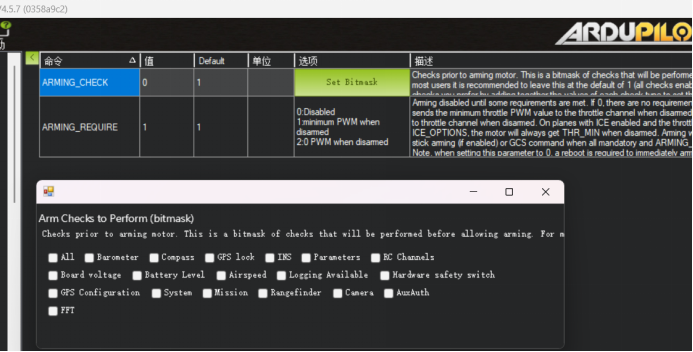
Important
Regardless of the approach selected, do not set ARMING_CHECK directly to 0. Instead, disable only inapplicable fault checks, such as logging failure caused by a missing MicroSD card or a compass warning indicating that the compass is unhealthy. Complete compass calibration and verify that the status message reports "EKF3 active" before takeoff. Do not take off if the only status shown is DCM ACTIVE.
The status can be viewed in the OSD messages or in the message panel of the MP ground station after connecting the flight controller by USB.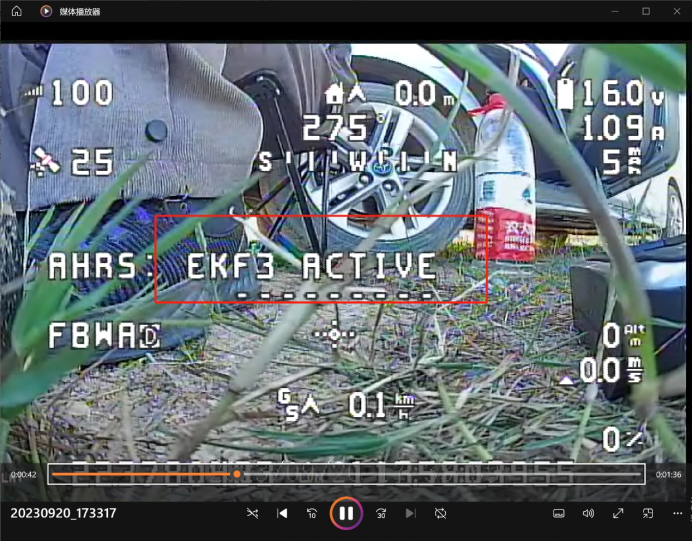
The image above is for demonstration only; ignore the other error messages shown.