Chapter 6: ESC Throttle Range Calibration
After assembly, calibrate the ESC throttle range while the ESC is connected to the flight controller. Remove all propellers before calibration and ensure that the motors cannot contact surrounding objects.
Procedure:
Connect the flight controller to the computer with a USB cable, open MP, and connect to the flight controller.
Set the radio transmitter mode switch to Manual mode.
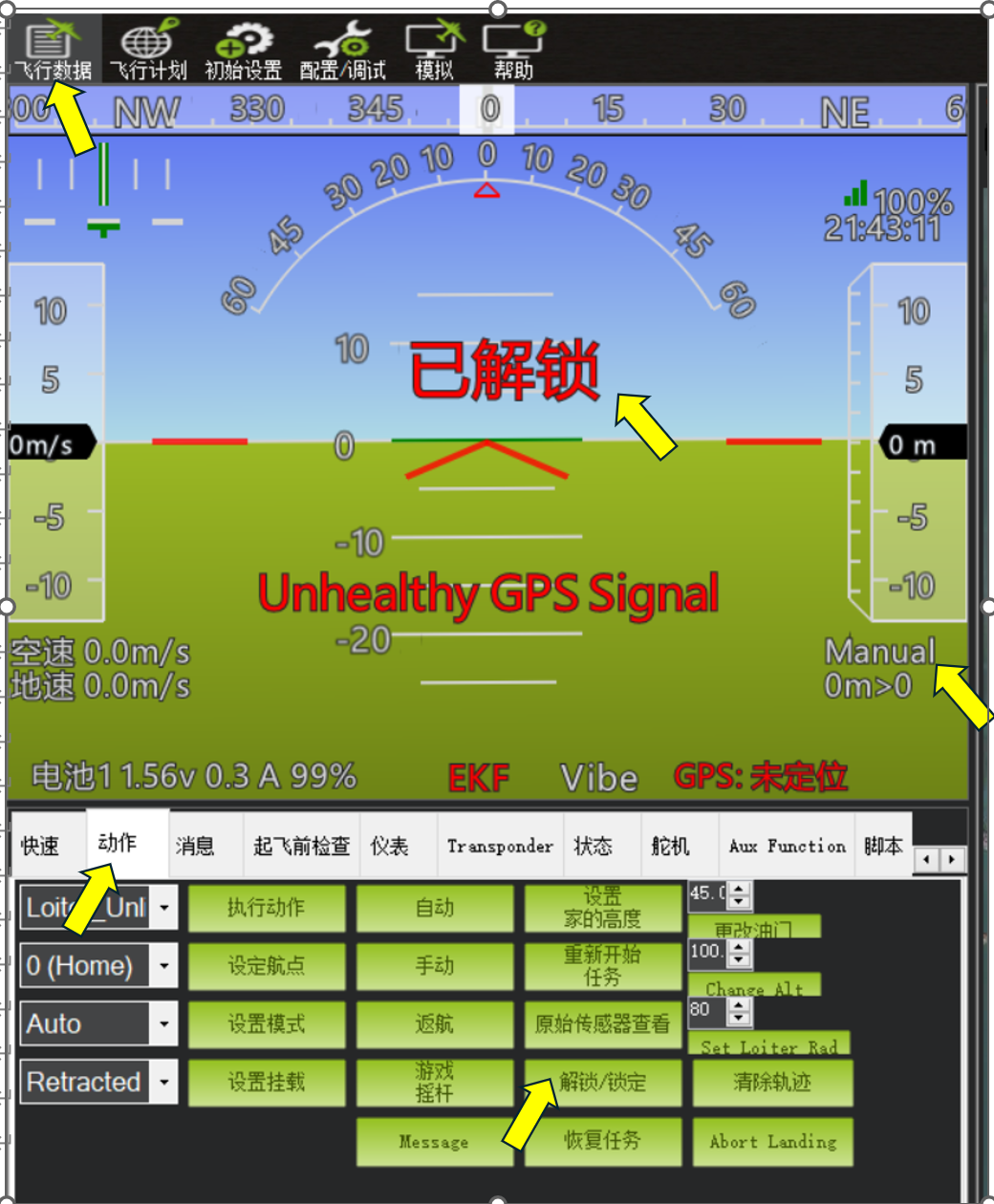
Under “Flight Data”---“Actions”, click “Arm/Disarm” and confirm that “Armed” is displayed. Move the radio transmitter throttle to maximum, then connect the ESC to the flight battery. If the ESC main power leads are soldered directly to the flight controller power distribution board, connect the flight battery to the flight controller instead. Wait for the ESC battery-detection tones; the exact tones vary by ESC. Move the throttle to minimum. A long confirmation tone indicates that the ESC has stored the minimum throttle value and calibration is complete.
For a twin-motor aircraft with two ESCs, calibrate each ESC separately. While calibrating the first ESC, disconnect the second ESC signal cable from the flight controller Servo output. After calibrating the first ESC, disconnect its signal cable, connect the second ESC signal cable, and repeat the calibration procedure for the second ESC.