Chapter 7: Flight Mode Configuration
ArduPilot uses one proportional channel to select among six flight modes. Channel 8 is used by default. The figure below shows the default ranges for the mode-selection channel.
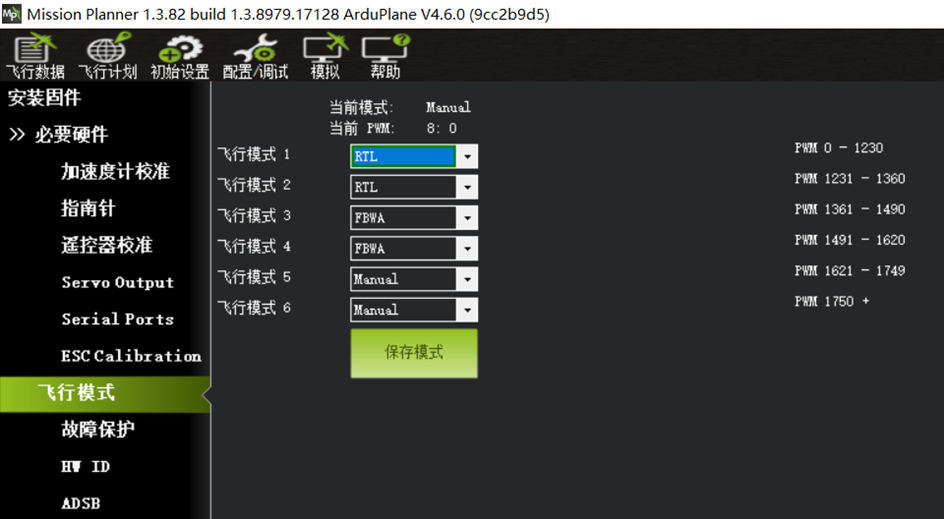
Use the drop-down arrow beside each flight mode position to select the required flight mode.
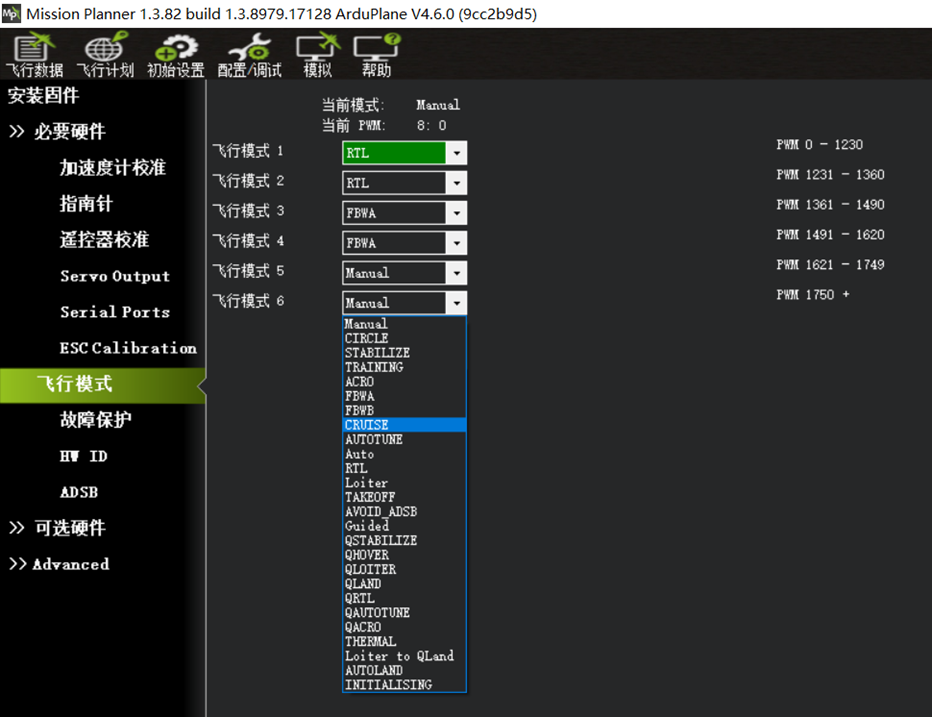
Characteristics of commonly used modes:
MANUAL: Manual mode. The flight controller does not stabilize or control the aircraft.
CIRCLE: Circling mode.
STABILIZE: Basic stabilization mode. The flight controller returns the aircraft toward level attitude while allowing attitude control from the radio transmitter. Use this mode if FBWA response feels too slow.
FBWA: Stabilized mode. Roll and pitch are limited to configured angles, and attitude is maintained automatically. Altitude is controlled with throttle. Recommended for beginners.
FBWB: Stabilized altitude-hold mode. Adds effective altitude hold to FBWA behavior.
CRUISE: Cruise mode. Maintains altitude and heading; strongly recommended for long-range flight.
ACRO: Attitude-lock mode. Similar to manual mode on an FPV quadcopter; the current attitude is held when the sticks are released.
AUTOTUNE: Automatic configuration and tuning mode.
AUTO: Automatic waypoint mission mode.
LOITER: Position loiter mode. The aircraft circles the current position at the configured altitude and radius.
RTL: Return-to-launch mode. The aircraft returns in a straight line to the home position, then circles at the configured altitude and radius.
TAKEOFF: Assisted hand-launch mode.
Based on broad user experience, the following mode configuration is recommended for fixed-wing aircraft.
(Verify that the radio transmitter six-position switch selects each mode correctly.)
Recommended six-position switch configuration:
1. RTL return-to-launch mode.
2. FBWA stabilized mode.
3. CRUISE mode.
4. ACRO attitude-lock mode.
5. LOITER mode.
6. MANUAL mode.
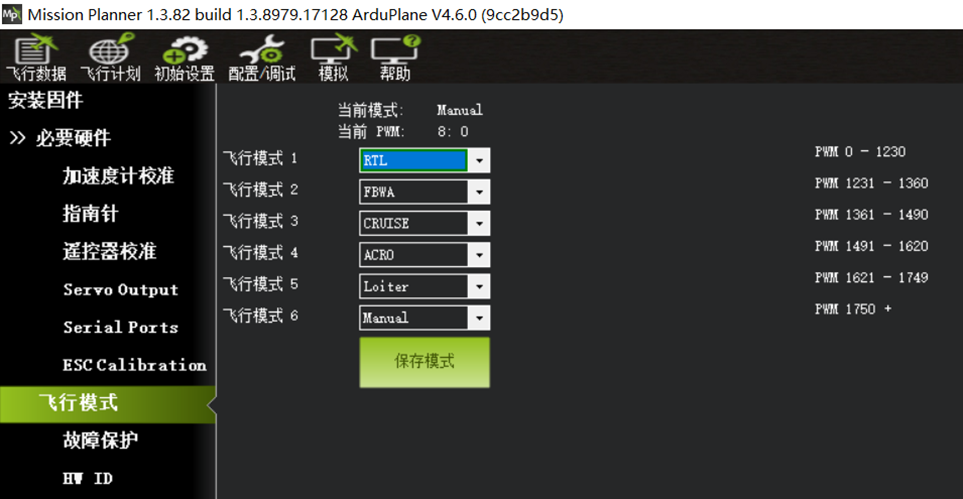
Some radio transmitters include a six-position switch, such as the Jumper T16/T18 and RadioMaster TX16S. The output ranges of these switches may not align with the six ArduPilot mode ranges. Add a curve to the transmitter proportional channel assigned to the six-position switch using the following values:
Six-Position Switch Curve Configuration
-100 -60 -20 20 60 100
-85 -45 -15 15 45 85
Some radio transmitters running the open-source EDGETX system provide six separate buttons rather than one proportional six-position switch, including the RadioMaster GX12 and BOXER, Jumper T-Pro/T20S/T15, and Bee models. Configure mixing for CH8 on the transmitter MIXER page. Refer to the operating tutorial for the specific transmitter.
Some radio transmitters do not have a six-position switch, including the FrSky X9D, Jumper T-Lite, RadioMaster TX12, and Zorro.
Use a three-position switch for three commonly used flight modes, then assign additional two- or three-position switches to activate individual modes.
ArduPilot selects the mode requested by the most recently activated mode switch.
Selecting Modes with Independent Channel Switches
Example:
Use a three-position switch on radio channel 8, the flight controller default mode channel. During configuration, match each switch position to the corresponding mode slot.
Select FBWA stabilized mode, CRUISE altitude-and-heading mode, and LOITER position loiter mode.
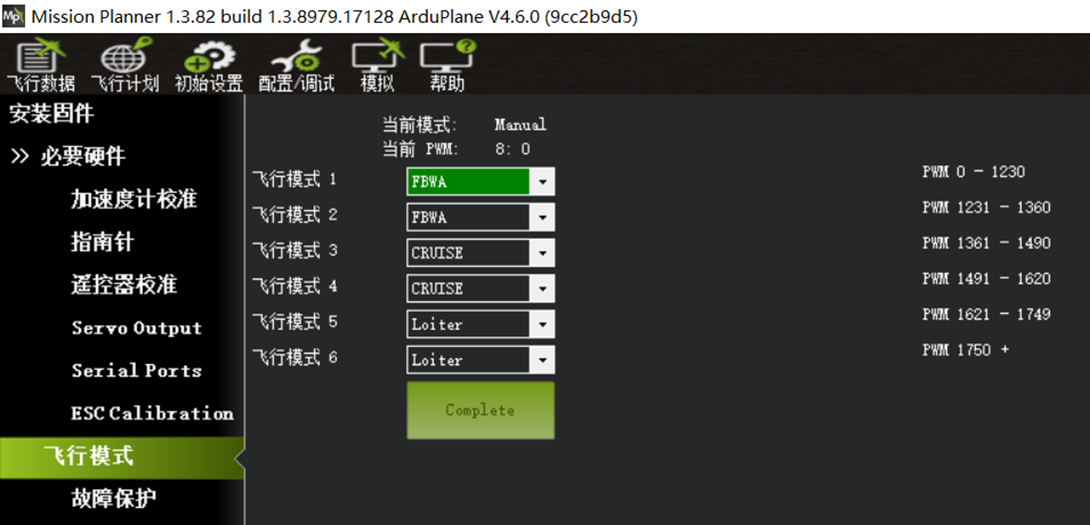
Use a two-position switch on radio channel 5 to activate TAKEOFF hand-launch mode.
Use a two-position switch on radio channel 6 to activate RTL mode.